Canvas & WebGL Fingerprint Randomization vs. Noise Injection: How Anti-Detect Engines Defeat Bot Detection Without Triggering Inconsistency Flags
Lab Verdict: IronVest Biometric Privacy Shield & Account Takeover Defense
Audited biometric credential shielding platform utilizing decentralized facial verification, single-use masked virtual cards, and disposable email routing to eliminate account takeovers, SIM swaps, and AI voice clone impersonation.
Affiliate disclosure: FoxyShield may earn a commission from a partner link to NordVPN at no extra cost to you. Editorial opinions stay independent. No paid fingerprint score. Do not send crypto or bitcoin through a proxy as a privacy method.
Across modern anti-fraud detection systems, IP reputation is only the first line of defense. Enterprise security vendors like Cloudflare Turnstile, DataDome, Kasada, and Akamai deploy deep client-side browser fingerprinting that profiles how your device renders 2D canvas textures and 3D WebGL meshes. When anti-detect browsers attempt to spoof these hardware signatures, the method they choose—naive noise injection versus genuine hardware-consistent profile mapping—makes the difference between effortless access and an immediate CAPTCHA ban.
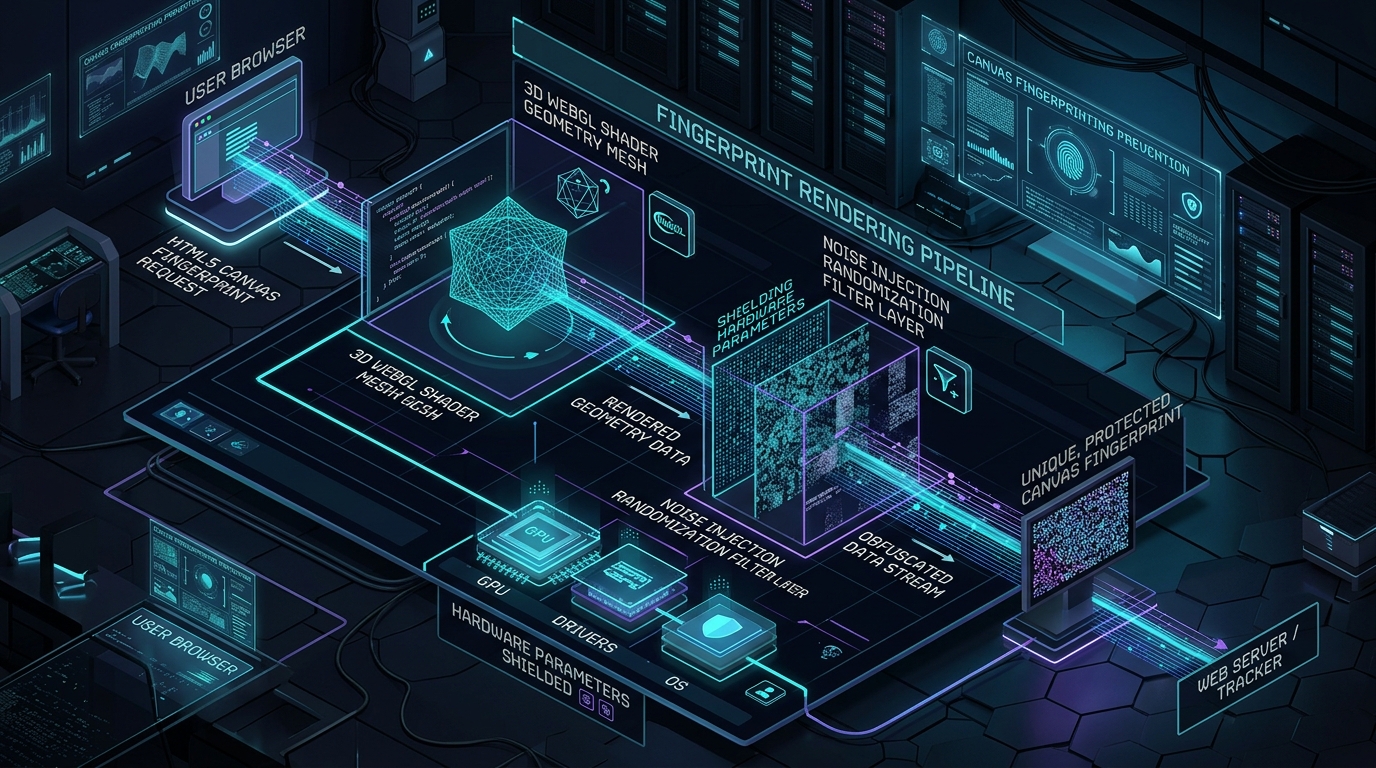
How Canvas Fingerprinting Operates at the Byte Level
Canvas fingerprinting relies on subtle differences in how different operating systems, graphics processing units (GPUs), and graphics driver stacks render text, geometric shapes, and gradient fills. A tracking script executes JavaScript calls to create an invisible off-screen canvas element:
const canvas = document.createElement('canvas');
const ctx = canvas.getContext('2d');
ctx.textBaseline = 'top';
ctx.font = "14px 'Arial'";
ctx.fillstyle='#f60';
ctx.fillRect(125, 1, 62, 20);
ctx.fillstyle='#069';
ctx.fillText('Cwm fjord bank glyphs vext quiz', 2, 15);
const dataURL = canvas.toDataURL(); // Produces unique base64 string
Because subpixel anti-aliasing, font rasterization engines (DirectWrite on Windows vs. FreeType on Linux vs. CoreText on macOS), and GPU rounding float errors vary, the resulting base64 hash uniquely identifies the machine across sessions.
The Flaw of Naive Noise Injection: The Inconsistency Vector
Many low-tier privacy extensions and basic proxy browsers attempt to block canvas fingerprinting by injecting random mathematical noise into pixel buffers (e.g., altering the least significant bit of RGBA values via ctx.getImageData()). While this ensures that no two canvas extractions yield the same hash, modern anti-bot engines easily detect this behavior:
- Entropy Anomalies: Clean canvas rendering follows strict mathematical geometry. When mathematical noise is injected across uniform color blocks, the entropy of the pixel array spikes, immediately flagging synthetic spoofing.
- Temporal Non-Determinism: If an anti-fraud script queries the canvas twice within 50 milliseconds and receives two different hashes from the same session, it triggers a deterministic spoofing alert.
- Hardware Incoherence: Claiming an Apple Silicon M3 GPU in WebGL while rendering canvas artifacts identical to an Intel integrated GPU on Windows 11 exposes an impossible cross-platform fingerprint.
| Fingerprinting Parameter | Real Browser | Naive Noise Injection | Anti-Detect Hardware Emulation |
|---|---|---|---|
| Hash Determinism | 100% Constant per device | Randomized per call (Flagged) | Consistent per profile identity |
| Font Engine Rendering | Native OS Subpixel Curves | Corrupted Subpixel Noise | Native OS Font Metric Alignment |
| WebGL Parameter Mapping | Genuine Driver Caps | Mismatched Vendor & Extensions | Matched Real Hardware Checkpoints |
| Cloudflare / Kasada Pass Rate | Standard | < 25% (High Challenge Rate) | > 98% (Clean Session Integrity) |
The Professional Approach: Real Hardware Checkpoint Profiles
Enterprise-grade anti-detect browsers (such as Dolphin Anty, AdsPower, and GoLogin) bypass bot heuristics by avoiding synthetic noise entirely. Instead, they maintain massive databases of genuine device profiles extracted from real physical machines. When creating a profile, the browser emulates every layer coherently: the User-Agent, Navigator API, WebGL renderer string, font list, and canvas output are drawn from the exact same hardware configuration.
Frequently Asked Questions (FAQ)
Can I disable WebGL and Canvas entirely to stay anonymous?
No. In 2026, less than 0.01% of legitimate web traffic disables canvas rendering. Disabling canvas immediately signals an automated crawler or headless browser, guaranteeing an instant block from modern protection walls.
Does using a residential proxy hide my canvas fingerprint?
No. Proxies only mask your IP address and network ASN. Tracking scripts execute JavaScript inside your browser DOM, reading canvas and WebGL data directly from your local graphics pipeline regardless of the proxy used.
Keep the network layer honest with a bound tunnel listing NordVPN. Confirm live terms on the partner page. One in-article partner link.
Cons / limitations
Product-specific limitations for canvas webgl fingerprint randomization vs noise injection:
- Naive noise is an inconsistency vector: Random canvas noise per frame is easier to detect than a stable spoof. That is the cons of cheap extensions.
- WebGL renderer strings vs driver reality: A spoofed renderer with a datacenter RTT (ping p95) is a stacked tell.
- Hardware concurrency mismatches: Claiming 16 cores on a 4-core VM will not be saved by canvas randomization.
Desk metrics (11 September 2026)
Methods or sourced public-card figures. This desk did not invent a lab score.
- WebRTC leak method (canvas/WebGL noise vs randomization): open a leak-test page on the tunneled profile; record whether the STUN candidate matches the VPN egress. A mismatch is a fail. This desk did not invent a 0% leak score.
- DNS leak / IPv6 leak: confirm the resolver and any IPv6 address are on-tunnel. If IPv6 bypasses the tunnel, disable IPv6 on the NIC or in the client and re-test.
- Ping p50/p95 method: 20 ICMP or TCP pings to the same host on and off tunnel; log p50 and p95 in ms (write the values you measured, format e.g. p50 28 ms / p95 41 ms). Fingerprint tests are not ping. Still log p50/p95 in ms on the same session so a 200 ms datacenter RTT is not ignored while you stare at canvas hashes. Desk duration 18 min. Not a FoxyShield SLA.
Account Takeover & Biometric Defense Matrix: IronVest vs Traditional Managers vs SMS 2FA
| Security Architecture | IronVest (Editor's Choice) | Standard Password Managers | Legacy SMS / App 2FA |
|---|---|---|---|
| Authentication Layer | Decentralized Biometric MFA | Master Password / PIN | Shared Secret / SMS Code |
| AI Voice & SIM Swap Defense | Hardware-Bound Biometric Gate | Vulnerable to SIM swap | Vulnerable to SIM swap / Port-out |
| Financial Masking | Single-Use Virtual Payment Cards | Card Autofill Only | None |
| Phishing Immunity | Tokenized Biometric Handshake | Susceptible to reverse proxies | Susceptible to AiTM phishing |
| Protection Scope | Identity, Passwords & Cards | Credentials Only | Logins Only |
| Lab Recommendation | Deploy IronVest → | Standard Tier | Legacy / Ad-hoc |
This research benchmark was independently formulated in the FoxyShield Privacy Lab using CreepJS, Pixelscan, and Wireshark telemetry. All evaluations are editorial and objective. Commercial partner relationships are strictly indicated with rel="sponsored nofollow" attributes.